

Equipment Choices that Reduce Time in the Field
- Jul 16, 2022
- 6 min read
Updated: Nov 4, 2024
When it comes to 3D laser capture there is nothing on the market at present that can rival the level of detail that can be captured with a survey grade 3D laser scanner. The time out in the field however is an issue; let's take a look at how the time on site could be more efficiently used.
There are many factors that can influence just how long it takes to complete a 3D laser scanning capture of a particular site, or another way of looking at it, how many scans can be completed on a given day. This may seem obvious but upgrading your equipment is one of the key factors in reducing the time required to capture what you need when out in the field. Noted below are some of the main equipment component choices I have made when it comes to 3D laser scanning and how they have impacted scanning time:
The Right Laser Scanner Can Save You Time
The most impactful choice in terms of time out in the field (and potentially the most expensive) is the 3D laser scanner you decide to use which also ties in with the overall time you spend to complete a project once you also take into account all the post processing required. For a number of years I have used a FARO Focus M 3D laser scanner to complete all my 3D capture projects.

“You can likely cut your scanning time in half or less by upgrading your 3D laser scanner.”
The FARO Focus 3D laser scanner typically takes up to 6 minutes to complete a colour scan of sufficiently high quality (down to as little as 4 minutes without having High Dynamic Range or HDR enabled). Switching to a Leica RTC360 3D laser scanner allowed for a single scan at higher resolution with HDR to be completed in under 2 minutes; on paper that is a 3 fold reduction in scanning time while also providing greater resolution with the end result. If you haven't upgraded your scanner in the past 5 years or more you can likely cut your scanning time in half or less by upgrading your 3D laser scanner.

The Leica RTC360 also has the benefit of having a Visual Inerital System (VIS) built into the scanner that allows multiple cameras along the body of the unit to constantly track its surrounding environment and therefore calculate its location in real time as you move the scanner from one scan position to another. In this way the VIS system helps to pre-position all the site scans relative to each other while you are out on site and you are able to monitor this progress via the scanning app. I have found that the VIS system works quite well in most circumstances and definitely helps reduce the time during both the scanning process and with any post processing registration of the scans.
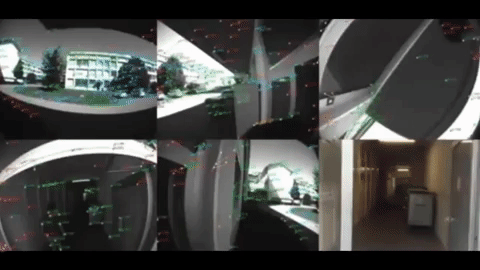
Here is a short video showing how effective the Visual Inertial System is when out on a project site:
I have found that simply upgrading the scanner is not the only critical factor that has an impact. Certain other factors such as the time it takes to reposition the scanner from one scanning location to the next plays a major role in the overall time you will spend out in the field.
As a side note also keep in mind that by upgrading to a faster scanner and greatly reducing the time it takes to complete each scan (in my case from 6 minutes down to just 2), you could actually see less of a reduction than expected as you may end up taking a lot more scans simply because you now have the luxury of time to do so!
The Right Tripod Can Save You Time
Depending on the project site and the tolerance of your specific 3D laser scanner for not being perfectly level prior to each scan, you will find yourself adjusting the tripod legs to some degree when out in the field. Currently most tripods on the market either have a "twist" or "flip" locking method for adjusting the length of each of the three tripod legs. Personally I have found twist locking tripods incredibly frustrating to use in terms of the time needed to adjust and would prefer to have a flip lock (also known as a lever or clamp lock) tripod as you can visually see that you have locked the tripod. There is however another kind of tripod which is technically still a flip lock, where the locking mechanism takes place right at the top of the tripod allowing you to literally pick up the tripod and 3D laser scanner from one location and set it down at the other, with any adjustment of the tripod possible in seconds with greatly reduced effort; it really needs to be experienced to fully appreciate how much time can be saved.
“I have been using this tripod for 3D laser scanning with the Leica RTC360 for at least a year now and cannot go back to using anything else when out on a project site.”
Another bonus; it is also great for saving your back, no more bending to adjust each of the 3 legs, you can keep a more or less upright position as you move from one scan location to the next. Given that the RTC360 weighs more than 5kg, the less strain on you the better.
I know this tripod is originally meant for video recording but I have been using it for 3D laser scanning with the Leica RTC360 for at least a year now and cannot go back to using anything else when out on a project site, it really does save an incredible amount of time when it comes to scan setup.
The Right Leveling Base Can Save You Time
Though large adjustments for levelling a scanner can take place with adjusting the tripod itself, smaller adjustments are always completed faster and more precisely with the use of a leveling base located between the scanner and the tripod itself. The traditional leveling base has been that which comes with 3 drawing or pulling screws that are independently adjusted in order to level the scanner on the tripod. This type of leveling base takes up an incredible amount of time when you need to do this for each and every scan location!
Again, just as with the tripod, putting aside whether a leveling base is meant for 3D laser scanners, for video or camera use, simply by keeping an open mind as to what may be possible and experimenting with trial and error when you can, often can lead to better solutions. After several years and thousands of completed scans I have settled on a ball head leveling base, specifically the Manfrotto XPRO Magnesium Ball Head. With its single clamp locking mechanism and built in bubble level it greatly reduces the time for final adjustments for scanner leveling.

Can you do better than the above XPRO ball head? Yes! How about the Sachtler AKtiv4 to go with the Sachtler Flowtech tripod; probably the fastest to adjust tripod head on the market, with a price to match!

Overview of the benefits of the Sachtler Aktiv4 tripod head:
The Right Phone or Tablet Setup Can Save You Time
Finally in terms of equipment when out on site the use of a large screen phone or a tablet to view your scans as you progress through the project site is incredibly useful, however if you are scanning on your own you cannot both handle the scanner as well as hold a phone or tablet at the same time to review results. Personally a phone with a large screen such as an iPhone Pro Max or Samsung Galaxy Pro Ultra provide a large enough screen and are ideal without the need to carry a tablet around when on site. This is where a phone case that comes with a lanyard is really helpful as you can let go of the phone with the lanyard around your neck and still have the phone within easy reach as you work your way through a project site. This may seem like a small detail but when you are completing hundreds of scans for a project you really do notice the time and effort saved when you focus on such small details.

Final Thoughts
The scanner, tripod, leveling base and phone app as a combined setup can greatly reduce the amount of time that is required out in the field. A single individual with the right tools can now in fact succesfully complete 80 scans a day when out on a project site and do so with the knowledge that the scans will be registered correctly based on real time feedback as they progress through a project site.

Of course keep in mind that the increasingly viable alternative to the above is 3D laser mapping technology which is quickly progressing with huge improvements in both the quality and accuracy of the captured data and holds the promise of drastically reducing the time out on site still further. In all likelihood 3D laser mapping is on a trajectory to replace terrestrial 3D laser scanning in the coming years. I hope until then the above information is useful.


Comments